What to Put on Your Wedding Website: The Complete Checklist
Everything to put on your wedding website, from schedule and RSVP to travel and dress code, plus FAQ wording, when to launch and how to keep it private.
Key takeaways
- The must-haves: your names and date, the schedule, venue addresses with maps, an RSVP with a deadline, travel and hotel details, the dress code, your registry and an FAQ.
- Launch the site when your save-the-dates go out, usually 6 to 8 months before the wedding (8 to 12 months for a destination wedding), and keep it updated.
- Answer the questions guests actually ask (plus-ones, kids, parking, gifts) once, on the site, instead of 100 times by text.
- Keep it private: no home addresses on a public page, and personal guest links or a password for the RSVP.
The wedding website checklist
A wedding website has one job: give every guest the answer before they have to ask. These are the sections almost every wedding needs, in roughly the order guests look for them.
| Section | What to include |
|---|---|
| Home | Your names, the date, the city and a short welcome. A countdown is a nice touch. |
| Schedule | Every event guests are invited to (ceremony, reception, welcome drinks, the day-after brunch), each with a start time, an end time and an address. |
| Venues and maps | Venue names, full addresses, a map link, parking and which entrance to use. Mention step-free access if you have it. |
| RSVP | The deadline, meal choices, dietary needs and exactly how many seats each invitation includes. |
| Travel and stay | Nearest airports and stations, hotel blocks with booking codes and deadlines, shuttles and taxi tips. |
| Dress code | The dress code in plain words, plus anything practical: grass, sand, an outdoor ceremony, cold evenings. |
| Registry | Links to your registry or honeymoon fund, with a short, warm note. |
| FAQ | The questions in the next section, answered once. |
| Contact | Who to ask with questions. In the last week, ideally someone other than the two of you. |
Nice extras
- Your story and a few photos
- The wedding party, with a line about each person
- Things to do nearby, for guests who travel
- A livestream link for guests who can't come
- Song requests
- The site in a second language if your families speak different languages
Wedding website FAQ ideas, with wording
These are the questions guests ask most. Short, friendly answers on the site prevent awkward conversations later.
| Question | Wording you can use |
|---|---|
| Can I bring a plus-one? | "We've reserved [number] seats in your honor. Your invitation and RSVP show the names included." |
| Are kids welcome? | "We love your little ones, but our celebration is adults-only. Enjoy a night off!" Or: "Children are very welcome. Please tell us their ages when you RSVP." |
| What should I wear? | "Cocktail attire. The ceremony is on grass, so block heels or flats are a good idea." |
| When is the RSVP deadline? | "Please RSVP by [date] so we can give the venue our final numbers." |
| Is there parking? | "Free parking is available at the venue. Shuttles leave the hotel at [time]." |
| Can I take photos during the ceremony? | "We're having an unplugged ceremony: please keep phones away until we say 'I do'. Our photographer has it covered." |
| What about gifts? | "Having you with us is the best gift. If you'd like to give something, our registry is linked here." |
| Is the venue accessible? | "The ceremony and reception are step-free. Let us know if you need anything else." |
| I have a dietary need. | "Tell us on the RSVP form and we'll make sure the kitchen knows." |
| What if it rains? | "There's an indoor space ready at the same venue." |
When to launch it, and when to update it
| When | What to do on the site |
|---|---|
| 8 to 12 months before | Destination wedding: launch with the date, the location and travel and hotel details, because guests need time to book. |
| 6 to 8 months before | Launch with the save-the-dates, and print the link or a QR code on them. |
| 6 to 8 weeks before | Send the invitations, open the RSVP and add the full schedule. |
| 3 to 4 weeks before | RSVP deadline. Chase missing replies and finalize meal choices. |
| The last week | Add day-of details: timings, parking, shuttles, the rain plan and a contact person. |
| After the wedding | Say thank you, and share photos or a link to the gallery. |
Privacy and RSVP tips
- Don't publish home addresses. Wedding sites are easy to find by searching your names. Keep your own address and your families' addresses off the public page.
- Use personal links for the RSVP. A personal link per household ("Dear Sarah & Tom") lets each guest reply only for the seats you invited, which avoids the surprise plus-one.
- Add a password, or keep the page out of search engines, if your platform lets you, especially for the schedule and the venue details.
- Skip the public guest list, and ask before posting photos of other people's children.
- Remember what the date tells people. A public page also says when your home will be empty, so share details such as your honeymoon dates only with people who need them.
How to make a wedding website: your options
| Option | Cost | Good for | Trade-offs |
|---|---|---|---|
| All-in-one wedding platforms, such as The Knot, Zola or Joy | Usually free | Couples who want the website, registry and guest list in one place | Their branding and layouts, so many sites look alike; your guest list lives on their platform |
| General website builders, such as Squarespace or Wix | A monthly or yearly plan for a custom domain without ads | Couples who want full design control | A subscription, and you design the site yourself |
| A wedding website template you own | A one-time price, with free hosting options | A personal look without a subscription | You publish it yourself, which takes a few minutes with a guide |
Digital or paper invitations?
Digital invitations are now common and perfectly polite for most weddings, especially with a website behind them. Many couples send paper to grandparents and older relatives and a digital invitation to everyone else. Whatever you choose, put the website link on the save-the-date so guests know where to look.
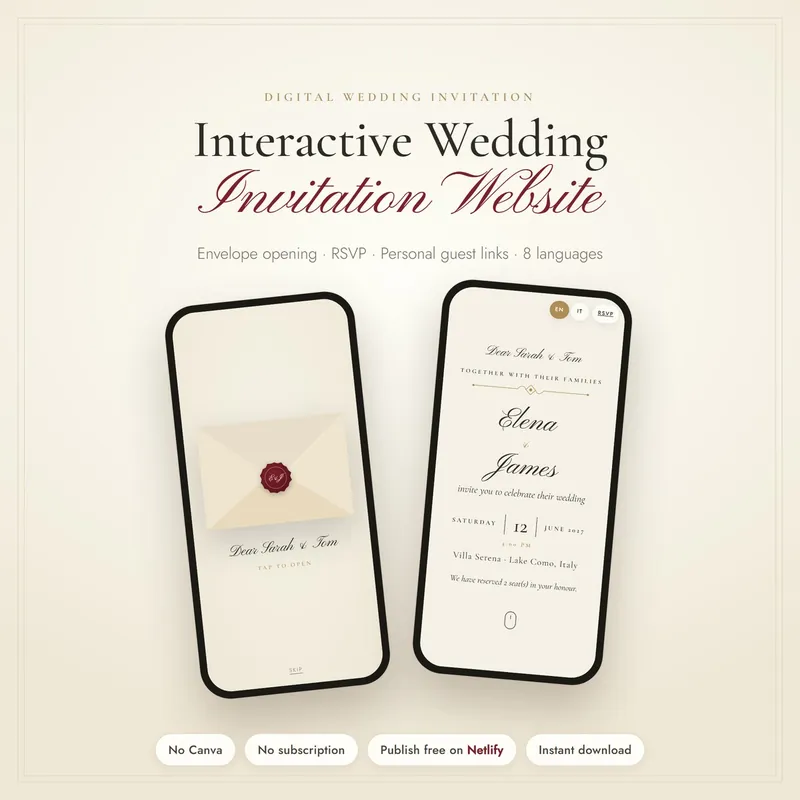
Our own wedding invitation website is the third option. Guests open it like a real envelope with your monogram wax seal, then find a live countdown, calendar buttons and an RSVP limited to their seats. It comes in 8 languages and 5 themes, with QR cards and save-the-date images, and you publish it for free on Netlify in about 2 minutes with an illustrated step-by-step guide.
Welcome text and other wording ideas
- Welcome: "We're getting married! We can't wait to celebrate with you in [city] on [date]. Everything you need is on this page. If anything is missing, ask [name] at [phone or email]."
- RSVP: "Please reply by [date]. Your invitation includes the guests named below."
- Registry: "Having you with us is the best gift. If you'd like to give something, we've put together a small registry and a honeymoon fund."
- Hotel block: "We've reserved rooms at [hotel] until [date]. Mention our names or use code [code] when you book."
- After the wedding: "Thank you for celebrating with us! Our photos are here."
Frequently asked questions
When should a wedding website go live?
When you send your save-the-dates, usually 6 to 8 months before the wedding, or 8 to 12 months before for a destination wedding. You can start with the basics and add the full schedule and the RSVP when the invitations go out.
Should the wedding website be on the save-the-date?
Yes. Print the web address or a QR code on the save-the-date, so guests can find travel and hotel details early.
What should you not put on a wedding website?
Home addresses, a public guest list, anything about who isn't invited, and long lists of rules. Keep money requests gentle and point to a registry or a fund rather than asking for cash.
Are digital wedding invitations okay?
Yes. They are common and polite for most weddings, especially when they link to a website with all the details. Many couples still send paper invitations to older relatives.
Do I need a custom domain for my wedding website?
No, but a short address is easier to type from a printed card. Whatever address you use, test it on a phone and add a QR code to anything you print.