How to Create a Content Calendar You'll Actually Stick To (With a Template)
Build a social media content calendar in six steps: a goal, your channels, content pillars, a rhythm you can keep, the columns to track and a weekly routine.
Key takeaways
- A content calendar is a schedule of what you will publish, where and when, plus the status of each piece.
- Start with one goal and the one or two channels where your audience already is; add more only once posting is a habit.
- Pick 3 to 5 content pillars and rotate them, so your feed stays varied and on-topic.
- Choose a posting rhythm you can keep for 90 days, set a draft deadline before every publish date, and review what worked each month.
What a content calendar is, and why it helps
A content calendar is a schedule of the content you plan to publish: the date, the channel, the topic, the format and where each piece stands. It can live in a spreadsheet, a calendar app or a Notion database. Whatever the tool, it gives you five things:
- Consistency. You post on a rhythm instead of in bursts.
- Less scrambling. You know on Monday what goes out on Thursday.
- Balance. You can see at a glance if you've only posted promotions for three weeks.
- Collaboration. A designer, a client or a teammate can see what's coming.
- A record. You learn which topics and channels actually bring results.
How to create a content calendar in 6 steps
1. Set one goal
Write down what the content is for, with a number: "4 client inquiries a month from LinkedIn" or "1,000 newsletter subscribers by June". The goal decides what you post and what you measure.
2. Choose your channels
Go where your audience already spends time. A B2B consultant may need LinkedIn and a newsletter; a wedding photographer, Instagram and Pinterest. One or two channels done well beat five done badly.
3. Pick 3 to 5 content pillars
Pillars are the recurring themes that everything you publish fits into. They stop you from staring at a blank page and keep your feed tied to what you sell. An example for a freelance web designer:
| Pillar | Example post | Share |
|---|---|---|
| Teach | "3 homepage mistakes that cost you leads" | 40% |
| Show the work | Before and after of a client's site, with the result | 30% |
| Behind the scenes | Your process, your tools, a day in your week | 20% |
| Offer | Your availability, a new service, a client testimonial | 10% |
4. Set a posting rhythm you can keep
Consistency beats volume. A rhythm you can keep for 90 days is worth more than a burst of daily posts that stops after three weeks. Start lower than you think, for example:
- LinkedIn: 3 posts a week
- Newsletter: every two weeks
- Instagram: 2 posts a week, plus stories when you have something to show
5. Build the calendar
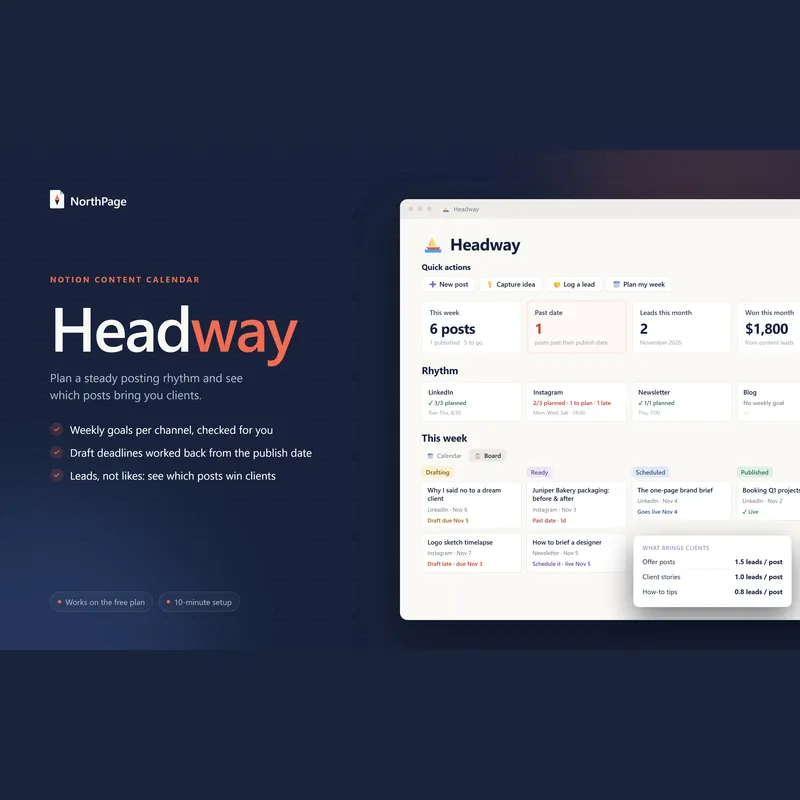
One row per piece of content, with these columns:
| Column | What it holds |
|---|---|
| Title or idea | A working title, enough to remember the point |
| Publish date | The day it goes live |
| Channel | LinkedIn, Instagram, newsletter, blog… |
| Pillar | One of your 3 to 5 themes |
| Format | Text post, carousel, short video, article, email |
| Status | Idea → Drafting → Ready → Scheduled → Published |
| Draft deadline | A few days before the publish date, so you're never writing at the last minute |
| Link | The published URL |
| Results | Reach, clicks, replies and, most of all, inquiries |
Three views of the same list make it easy to use: a calendar by publish date, a board by status, and an idea list you add to whenever inspiration strikes.
6. Run a weekly routine
- Monday, 30 minutes: check this week's posts and move the next ideas into drafting.
- One batch session: write the week's posts in one sitting; it is much faster than one at a time.
- Schedule: use each platform's own scheduler or a scheduling tool.
- Daily, 10 minutes: reply to comments and messages.
- Monthly: review results by pillar and channel, and adjust the next month.
Where to find content ideas
- Questions clients ask. Every question you answer twice is a post.
- Recent projects. The problem, what you did, the result: a short case study.
- Mistakes you see. "The one thing I fix on every new client's site."
- Your tools and process. People hire people whose process they understand.
- News in your field, with your opinion on it.
- Repurposing. Turn one article into a LinkedIn post, a carousel and a newsletter section.
- Search. The "People also ask" box in Google and questions in forums show what people want to know.
How to measure what works
Likes feel good, but for a freelancer or small business the number that matters is inquiries, and then clients. Match what you measure to your goal:
| Goal | What to measure |
|---|---|
| Awareness | Reach, impressions, new followers |
| Engagement | Comments, saves, shares, replies |
| Traffic | Link clicks and visits to your site |
| Leads | Inquiries, booked calls and clients won |
To see which posts bring work, ask every new client how they found you, use tagged links where you can, and note each lead next to the post that brought it. After 90 days you'll know which pillars and channels are worth your time.
Common content calendar mistakes
- Planning more than you can make. An empty slot in a too-ambitious calendar feels like failure; plan for your real week.
- No draft deadlines. A publish date without a draft date means writing at 11 pm the night before.
- Only promotional posts. People follow you for help and stories; the offer works because of them.
- The same post everywhere. Adapt the format and length to each channel.
- Never reviewing results. Without the monthly review, the calendar is just a to-do list.
- Planning months of posts in detail. Plan themes monthly and posts weekly, so you can react to what's happening.
Once the inquiries come in, our guide to invoicing as a freelancer covers the part where you get paid.
Frequently asked questions
What should a content calendar include?
For each piece: the title or idea, the publish date, the channel, the content pillar, the format, its status, a draft deadline, the link once published and its results. Larger teams add an owner for each piece.
How far ahead should I plan content?
Plan themes one to three months ahead and individual posts one to two weeks ahead. That keeps you consistent while leaving room for timely topics.
How often should I post on social media?
As often as you can keep up for months, not weeks. For a freelancer or small business, two to three good posts a week on one main channel usually beats daily posts that stop after a month.
What are content pillars?
Content pillars are three to five recurring themes that everything you publish fits into, such as teaching, showing your work, behind the scenes and your offer. Rotating them keeps your content varied and tied to what you sell.
Is a spreadsheet good enough for a content calendar?
Yes, to start. A database tool such as Notion adds a calendar view, a status board, automatic deadlines and links between posts and the leads they bring, which a spreadsheet can't do easily.